Inside Looking Out

Inside Looking Out: How I Sort and Select Photos for Editing

Readers frequently ask how I move from a memory card full of frames to a finished image, so I decided to start writing my process down. It keeps changing, and what suits me may not suit you. In this post I explain how I file my photographs and how I decide which ones deserve editing time.
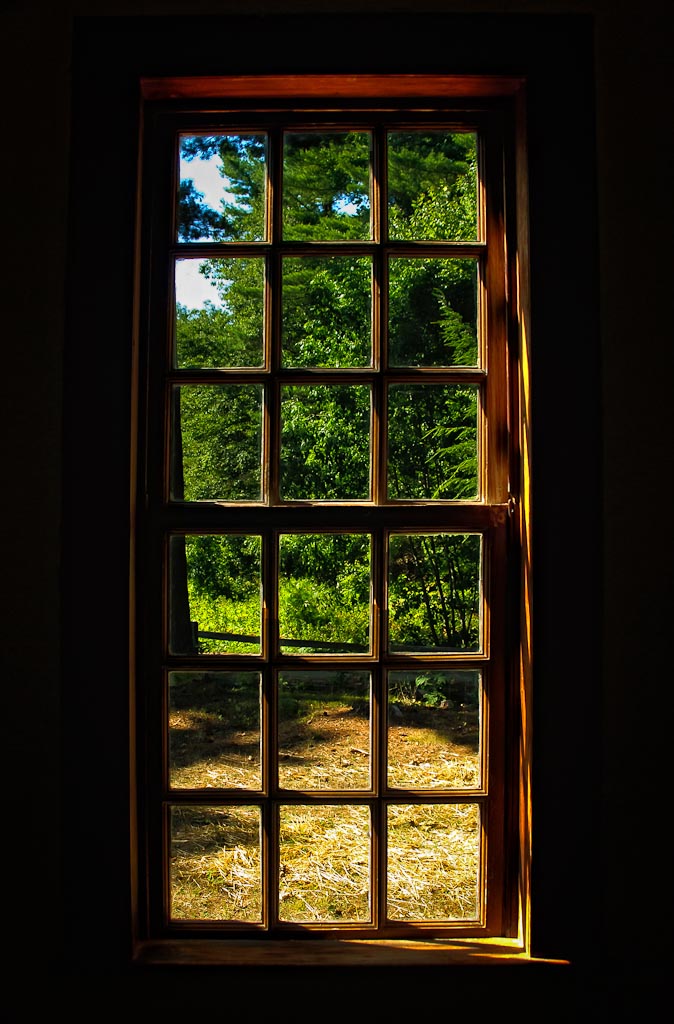
View from inside an old cabin at Old Sturbridge Village looking out through a glowing window frame
Shot inside one of Old Sturbridge Village's cabins, where outside light lit the weathered window frame

A little background first. When photography was still a full-time hobby, I would pick my keepers and process them right away before posting them online. It did not take long to see that I was not being choosy enough and was burning hours on images that honestly were not worth the effort. Coming home also brought a nagging pressure to process every single frame. So I grew stricter, keeping only pictures I genuinely liked and believed had promise. My digital darkroom abilities were fairly basic in those days, so I would edit a handful from each outing and leave the rest for later, once my skills had grown.

Finding those unprocessed keepers turned out to be awkward given how I stored things. My library lives in a master photo folder holding a sub-folder for each year, and inside each year are further sub-folders for every shoot, named with the shoot and its date. That structure worked then and still works now, but hunting down the unprocessed keepers was tedious. Everything changed once I began using Lightroom's collections.

My Selection Workflow, Step by Step

  • Stop thinking in folders. The images still live in the same directory structure, but once imported into Lightroom I no longer browse them there.
  • Right after import, review everything: reject the obvious failures and give five stars to the clear keepers I want to process eventually.
  • Those five-star picks flow automatically into a collection called "To Be Processed".
  • Go through the remaining frames a second time, usually to judge similar shots I could not decide on yet, and promote the worthy ones to five stars.
  • When it is time to edit, ignore folder location entirely and browse the "To Be Processed" collection, choosing whatever feels right that day, whether it was shot last week or years ago.

How does your own approach compare with mine? Comments, suggestions and questions are all welcome.

Reader Discussion

Marc Collins
He also keeps a five-star folder in Lightroom meant for first processing, but admits he gets sidetracked editing three- and four-star images instead. He suspects he is almost afraid to touch the five-star shots in case he fails to do them justice, always feeling his skills are still improving and his best work should wait.
Len
He replies that this is not so strange, just human nature, and that he revisits five-star images he has already edited when his skills improve, hoping for a better or different result.
Victoria
She calls the picture beautiful and says she loves it.
Jim Nix
He enjoys this kind of shot and describes his own workflow: Aperture with folders arranged by geography then city, such as Texas then Austin or Dallas, or Europe then Madrid or London. When processing he jumps around, picking a few images at a time from different places for variety and the memories each trip brings back.
Steven Perlmutter
He praises the shot and its incredible lighting, confesses his own workflow is a disaster he could barely describe, and says he likes Len's method enough to try folding it into his mess.
Curt Fleenor
He also stores files as Photos, then Year, Location and Date, but ignores location once images are in Lightroom. He flags keepers on the first and second passes into a smart collection, uses star ratings for processing stages (one for later, two for stacked brackets with basics done, three for heavier work in Photomatix, PhotoTools or Topaz, four for final review, five for done and ready to post or print), and colour ratings for what happened to an image: green for blog, blue for Facebook only, yellow for printed. A finished posted image ends up flagged, five-starred and colour-rated, all visible in a five-star smart collection. He admits it sounds complicated but finds it quick and intuitive.
Len
He sees plenty of logic in that system and says it does not sound too complicated. He tried something similar himself but it spiralled out of control because he was not focused enough and occasionally skipped steps, which is why he believes everyone should build a workflow around their own needs and habits.
Edith Levy
She compliments the image as usual, thanks him for the post, and admits she does not yet own Lightroom but will get it soon. She also files photos by date and location and feels overwhelmed by the volume, likes the process described, and may ask him for advice once she has Lightroom.
Len
He strongly recommends getting Lightroom or Aperture, noting they leapfrog each other on features, and says he chose Lightroom because far more education is available for it. He mentions seeing a NAPP deal on Lightroom for $99, unsure whether it still applies, the lowest price he has seen, and offers to help by phone or email if she gets it.
A.Barlow
He calls it a really cool shot and says he loves these inside-looking-out images.
Chris Frailey
He thanks Len for a great image and tips.
Chris Nitz
He praises the framing and light, then describes importing images individually, making minor adjustments and colour-coding them yellow, sending them to Photoshop for full editing and saving as a PSD, applying final tweaks in Lightroom, then adding metadata and colour-coding green. Not perfect, he says, but it works well for him.
Kris Koeller
He enjoys reading about the process, saying he once posted hundreds of photos rather than the three or four he really liked. He is far more selective now and much less likely to discard something that a little thought and effort could turn into a great image, and calls the post nicely summarized.

Share and Connect

Share this post icon
Share this post
Commenter avatar
Reader avatar
CommentLuv heart icon
CommentLuv
Commenter avatar
Reader avatar
Smiley emoticon
Smiley
Commenter avatar
Reader avatar
Commenter avatar
Reader avatar
Commenter avatar
Reader avatar
Commenter avatar
Reader avatar
Commenter avatar
Reader avatar
Commenter avatar
Reader avatar
Commenter avatar
Reader avatar
Commenter avatar
Reader avatar
Commenter avatar
Reader avatar
Commenter avatar
Reader avatar
Commenter avatar
Reader avatar
Commenter avatar
Reader avatar
CommentLuv default icon
CommentLuv
Down arrow icon
Expand
RSS feed icon
RSS
Twitter icon
Twitter
Facebook icon
Facebook
LinkedIn icon
LinkedIn
Flickr icon
Flickr
StumbleUpon icon
StumbleUpon

Home Buildings & Architecture Share Leave a Comment Subscribe

Twitter Facebook LinkedIn Flickr StumbleUpon Feedburner

Lead in Lines Photofocus Scott Kelby

Log in